
AI-Powered Medical Newsletter Automation
How I built a fully automated 'Morning Brew for doctors' an n8n pipeline that scans PubMed daily, uses Claude AI to filter and analyse clinical research, and delivers a polished specialty newsletter to medical residents every week without a single human writing a word.
▢ Key Challenge
Sourcing and filtering genuinely relevant medical research across 30 specialties at scale, without drowning the AI in irrelevant content or blowing the API budget. Ensuring the newsletter reads like a human medical editor wrote it, not a robot.
The Brief: Morning Brew for Doctors
The client wanted a medical newsletter with the voice and energy of Morning Brew authoritative, punchy, and genuinely useful but for medical residents and new attendings across up to 30 clinical specialties. Each specialty edition needed to land weekly, cover the latest PubMed research, and feel like it was written by a knowledgeable colleague, not an algorithm.
The challenge: doing this for 30 specialties manually would require a team of medical writers. The brief was to automate the entire pipeline end-to-end from article discovery to inbox delivery while keeping the output quality high enough that readers wouldn't suspect AI.
The Google Sheets Control Panel
Before writing a single workflow node, I designed the Google Sheets database that acts as the system's no-code control panel. Non-technical operators can manage the entire newsletter operation without touching n8n.

| Sheet Tab | What It Controls |
|---|---|
| Specialties | Master list : toggle any specialty on/off with a single cell. Stores specialty name, audience, and PubMed RSS URL |
| RSS_Sources | Additional news sources per specialty (beyond PubMed), add any RSS feed URL |
| emails | Subscriber list per specialty - comma-separated, supports multiple recipients |
| Trivia | Pre-written medical trivia Q&A per specialty, AI generates on-the-fly if empty |
| Intro | Editorial intro text prepended to each newsletter edition |
Setting a specialty's active column to TRUE is the only step needed to include it in the next weekly run. The workflow reads this sheet at runtime and processes only active specialties.
The 8-Phase Automation Pipeline
The n8n workflow has 28 nodes organised into 8 phases. Here's how a single specialty travels from RSS feed to inbox:
The AI Analysis: What Claude Actually Does
Claude Sonnet 4 is used in three distinct roles within the same workflow:
Smart Cost Controls
Running AI analysis on 30 specialties weekly adds up. I built cost controls into the pipeline architecture:
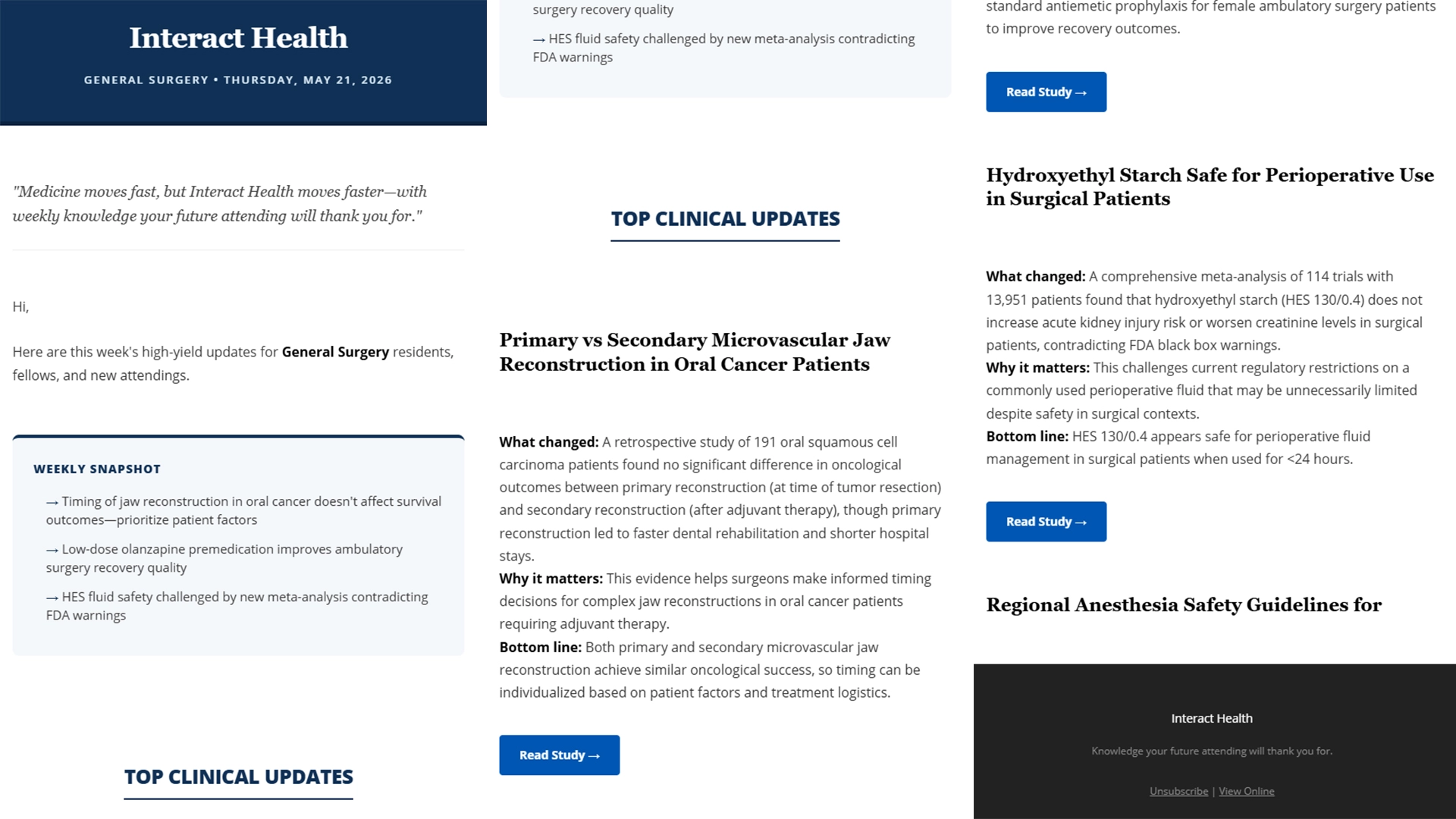
The Output: Branded HTML Email
A JavaScript node in n8n handles the Markdown-to-HTML conversion, producing a fully branded email with:
Results & Impact
Delivered a production-ready newsletter system covering up to 30 medical specialties. Each specialty gets its own weekly edition fully written, formatted as a branded HTML email, and delivered to subscribers automatically. Non-technical operators manage the entire system through a Google Sheet: toggle specialties, manage subscribers, update content, add trivia no workflow editing required.