
AI Chat System for WordPress Business Website
How I replaced a generic contact form with an intelligent chat assistant that automatically crawls the client's website, builds a knowledge base, and answers visitor questions 24/7 with full Hostinger deployment and WordPress integration.
▢ Key Challenge
Building a chat system that stays accurate as the website content changes without manual updates. The crawler had to handle multilingual content, respect rate limits, and stay within server constraints on shared Hostinger hosting.
The Problem: Static Websites, Dynamic Questions
The client ran a UK-based electronics business (Nidrip Central Electronics) on WordPress. Visitors would land on the site, browse products, and then leave, because they couldn't quickly get answers to specific questions about product compatibility, specifications, or stock. A generic contact form with a 24-hour response time was costing them conversions.
They needed an intelligent assistant that actually knew their business every product, every page, every detail and could answer visitor questions instantly. The solution had to run on their existing Hostinger server and integrate cleanly with WordPress.
System Architecture
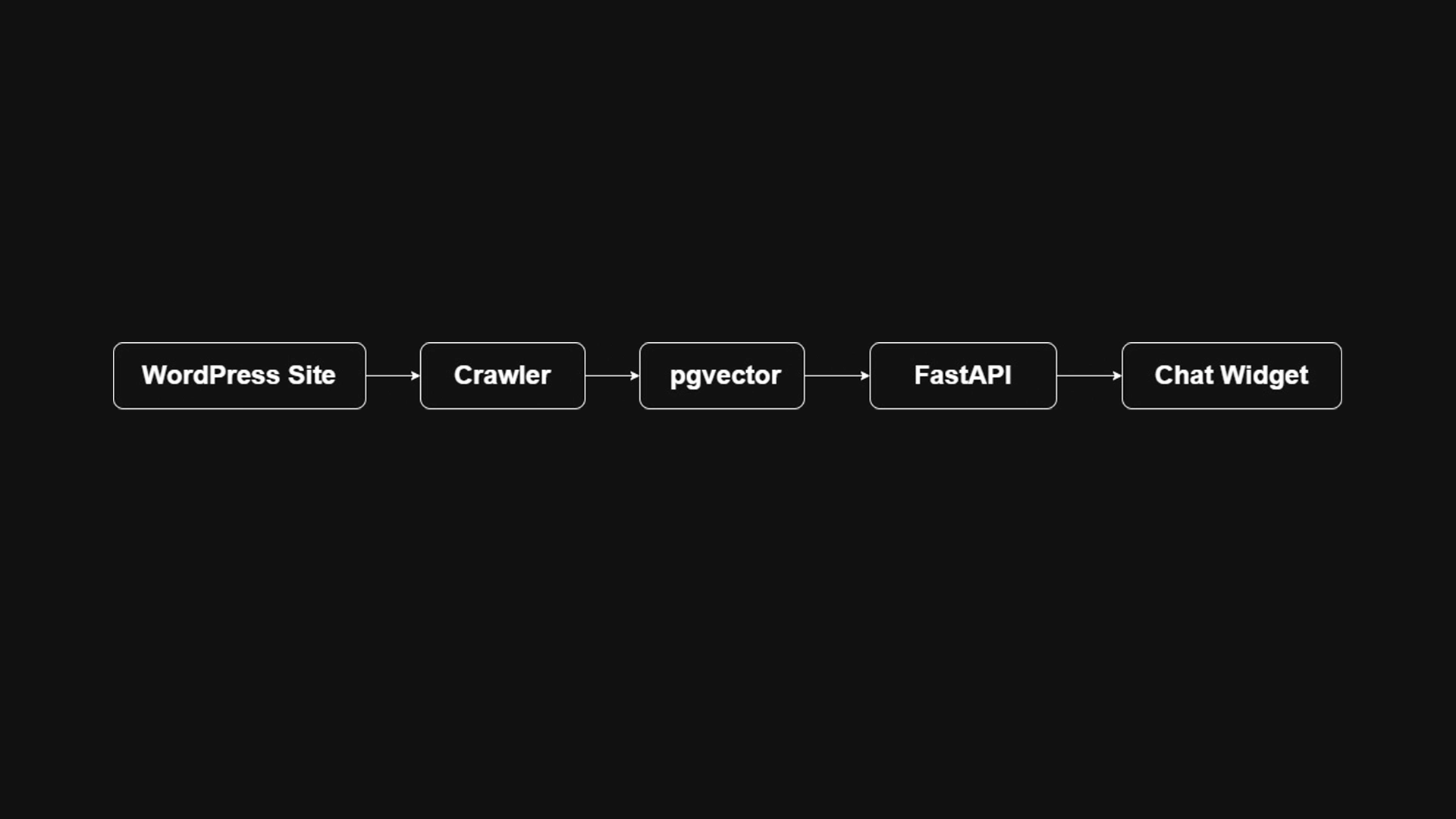
I built a fully self-contained RAG system packaged as a single Docker container managed by Supervisor. The key insight: instead of manually feeding content into the system, a background crawler automatically discovers and indexes the entire website on a schedule.
| Component | Technology | Role |
|---|---|---|
| API Backend | FastAPI (Python 3.11) | Chat endpoint, crawl triggers, health checks |
| Vector Database | PostgreSQL 15 + pgvector | Stores page embeddings for semantic search |
| LLM Engine | Ollama (llama3) | Local inference, no OpenAI costs |
| OpenAI Fallback | OpenAI API | Optional swap-in for higher quality responses |
| Web Crawler | BeautifulSoup4 + Requests | Auto-discovers and indexes all site pages |
| RAG Framework | LangChain | Retrieval chain, prompt management |
| Process Manager | Supervisor | Runs all services in one container |
| Web Server | Nginx | Reverse proxy + SSL termination |
| Containers | Docker Compose | Dev + prod configurations |
The Auto-Crawling Knowledge Base
The system's most valuable feature is automatic self-updating. Every hour (configurable in config.yaml), a background crawler starts at the site's root URL, follows internal links up to a configured depth, extracts clean text content from each page, and stores semantic embeddings in PostgreSQL.
# config.yaml the entire system configured in 5 lines
domains:
  - name: nidripcentralelectronics.co.uk
    start_url: https://nidripcentralelectronics.co.uk/
    languages: [en]

crawl_interval: 3600      # Re-crawl every hour
max_pages_per_domain: 150  # Safety limit
When the client updates a product page or adds new content to their WordPress site, the next crawl cycle automatically picks up the changes. Zero manual maintenance required.
Chat API & WordPress Integration
The FastAPI backend exposes a rate-limited chat endpoint (5 requests per minute per user) that handles the full RAG pipeline: embed the visitor's question → retrieve the top matching page chunks from pgvector → construct a prompt → generate a response via Ollama. Privacy is built in, all chat logs are stored with hashed queries and responses for DSGVO/GDPR compliance.
WordPress integration is a single line: add the embeddable JavaScript widget snippet to the theme's footer. The widget opens a chat panel that communicates with the FastAPI backend.
<!-- Add to WordPress footer, that's all the integration needed -->
<script src="https://your-server.com/static/widget.js"></script>
Dual LLM Mode: Local or Cloud
Hostinger Deployment
Hostinger's VPS environment required careful configuration. I set up the full production stack: Docker Compose with a dedicated Nginx container for SSL termination, Let's Encrypt certificate auto-renewal via a shell script, and Supervisor managing the FastAPI, Ollama, and crawler processes within a single container to minimise resource usage on the shared server.
Results & Impact
Delivered a fully self-contained AI chat assistant deployed on Hostinger, embedded in the client's WordPress site via a one-line script tag. The system automatically re-crawls the website every hour, keeping its knowledge base current. Visitors get instant, accurate answers about products and services at any time of day.